Showing posts with label comprehension. Show all posts

Monday, March 30, 2015

Comprehension

The whole point of teaching children to read is so that they can independently understand text, whether it's a story, a menu, or a schedule.  Practice with phonics, fluency, and decoding are done to build a foundation from which comprehending text can be built.

For some students, however, barriers exist that prevent them from reading and understanding printed text.  Examples include low vision and blindness, learning disabilities, and physical disabilities.  For students who are affected by any of these, electronic texts of literature and text books are available to use with popular text-to-speech software on computers and tablets.

Two services that make e-text available to students with the above disabilities are Learning Ally and Bookshare. Both services have freely available software for reading text aloud on a computer.  In order to use the service on an iPad, specific apps are needed.  Learning Ally has developed it's own app (called Learning Ally Audio), while Bookshare works with different apps, most notably Read2Go and Voice Dream Reader.



Monday, December 1, 2014

The 2014-2015 School Year: A Focus on Literacy and Technology in Specialized Settings


Like many other school systems across the state and country, our district invests heavily in technology to support teaching and learning.  We have the added responsibility to ensure that all students, regardless of ability or disability, can benefit from this technology in ways that are meaningful.

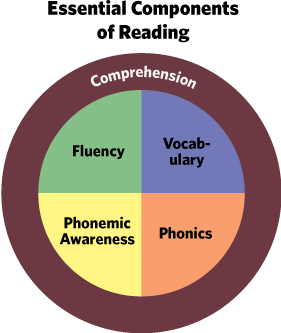
This school year, rareApps will take a deeper look at literacy and technology in specialized settings. Rather than report solely on the features of different apps and technology, our focus will be on examining the five components of reading instruction and investigating technology tools that can leverage research based strategies for instruction as well as support/provide accessibility features so that all students can take advantage of every type of lesson.

November and December: Vocabulary

January: Phonemic/Phonological Awareness

February and March: Phonics

April and May: Comprehension

June: Fluency


Wednesday, March 6, 2013

Voice Dream

by Voice Dream LLC

The text-to-speech app, Voice Dream, is the March app of the month.  The term text-to-speech means that the computer will read any text on the screen aloud.  This is useful for users who are blind or have low-vision, users who have reading difficulties, and users who are just beginning to read. 

The app connects seamlessly with the Bookshare service, which provides accessible content to qualifing users.  Please see the Bookshare website for more information about the qualifications.  Books downloaded from Bookshare are quickly loaded and prepared to be read aloud.

Teachers will find Voice Dream to be a useful way to provide grade-level content to students who are not yet reading at grade level.  For example, a 5th grader who is still learning to decode and improve fluency will be able to independently engage  with science text written at the fifth grade level.  By using the Dropbox service, teachers can easily provide students with accesible versions of the text.  Voice Dream can read text from the following formats:
  • PDF
  • MS Word and PowerPoint
  • Plain or rich text
  • some ePub (DRM-free)
  • HTML
Additionally, Voice Dream has a built in text editor, so a user can enter any text and have it read aloud.  For example, a student who is working with a hard-copy text book may get stuck with a particular word, phrase, or sentence.  By typing the text into the Voice Dream editor, the student could listen to the text repeatedly, helping comprehension.

The app allows many features to be adjusted such as text and page color, text size, highlighting, and rate of speech. 

Different voices are available for purchase and all of these are available to sample using the Voice Dream Lite version of the app.  The lite version will read the first few lines of text before the text-to-speech is disabled.

In conclusion, Voice Dream is a must-have for classrooms and families looking for a robust text-to-speech app that goes beyond the basic functions of iOS's built in VoiceOver functions. 


Voice Dream by Voice Dream LLC: $9.99

Other Text-to-Speech apps:
Natural Reader by NaturalSoft Limited: Free
Read2GO by Benetech: $19.99         


Wednesday, January 2, 2013

Toontastic

by Launchpad Toys

Toontastic is a wonderful storytelling app that allows kids to become cartoon designers.  The interface is easy to use and developing a story is step-by-step. 

The app uses a library of backgrounds and characters, called toys, that can be put together to create a scene.  A user can also draw unique characters and backgrounds using a built-in image editor.  The scene is then recorded as the user plays with the toys on screen, much like playing with real-life action figures or dolls. 


The app walks a child through the story arc process - introduction of the story and problem, conflict, and resolution.  Of course, it's up to the child to follow these suggestions - my own son was happy to create scene after scene of pirates engaged in battle!  This however presents a perfect teaching opportunity for analysis and comparison to other well-known stories.

Another use of this app is to retell a story to improve comprehension.  Arthur Glenberg and his colleagues have researched ways in which the manipulation of objects that correspond to elements from a story increase comprehension. Toontastic may be a starting point for students who are unable to manipulate physical objects to rehearse a passage that they have read or listened to.  While the app doesn't provide built-in accessibility supports, it does offer a place for educators to begin thinking about ways to foster independent reading comprehension practice.  Could this app be paired with other classroom techniques, such as communication boards and graphic organizers, to provide storytelling capabilities to all students? 

Article Summary: Apps and Reading

Educational Apps Alone Won’t Teach Your Kid to Read

By Lisa Guernsey and Michael Levine published on Slate.com, December 13, 2012
Educational Apps Alone Won't Teach Your Kid to Read

This is a fantastic article that clearly reports on the current state of educational apps related to reading. The following is a brief summary of the article.
There exist thousands of apps on the marketplace, many claiming to teach children how to read.  Guernsey and Levine found that most apps teach the most basic reading skills of letter identification and letter/sound relationships.  Presently, neither app nor ebook has harnessed the affordances of iPads and tablets to teach higher level skills of vocabulary and comprehension, which are critical components of reading for purpose.
·         Most top-selling reading apps teach the basics: alphabet identification and phonics

·         Most apps don’t address higher-level skills like vocabulary and comprehension – critical components for becoming a fluent reader

·         Many ebooks are currently designed to be watched, rather than read

·         Ebooks could leverage the interactivity of the tablet, but for the most part developers aren’t designing stories to address comprehension and vocabulary

·         The authors imagine a good ebook as one that asks questions that leads to interaction with the screen – combined with interaction with the parent or teacher

·         80% of top-selling paid education apps are marketed for children, many claiming to help children learn to read

·         Apps often do not provide information about how and if they accomplish their stated goals

“At its best, the technology complements the work of trained teachers and parents.  It doesn’t replace it.”
-Guernsey and Levine