Showing posts with label phonemic awareness. Show all posts

Friday, January 23, 2015

Phonological Awareness

Software and apps exist that support the development of phonological and phonemic awareness (PA).  Often times, these two terms are used interchangeably and they essentially mean the same thing: the recognition and manipulation of sound parts that make up words.  Phonological deals with units of sound at the level of syllables, blends, and digraphs while phonemic implies segmenting syllables into the smallest unit of sounds, the phonemes: /sh/ /i/ /p/.  A more thorough explanation can be found here.

The age at which typically developing children can do different PA skills is described on this Reading Rockets page regarding PA. As you can see from the table below, between the ages of 4 and 6, children are able to rhyme words, recognize alliteration, count syllables, and recognize/match initial sounds of words.  Manipulating phonemes within a word is a skill that develops until age 9, so PA instruction for typically developing students can continue well into third grade

This table describes the what PA skills children can do at ages 4, 5, and 5 and a half.

Here is a list of software and apps that were shared during January's workshop:

Rhyming from I Can Do Apps, $2.99
https://itunes.apple.com/us/app/rhyming-from-i-can-do-apps/id548874184?mt=8
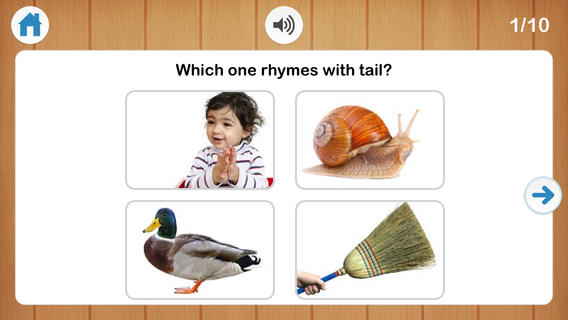
The text can be removed to make it a true PA experience.  Two to four pictures can be displayed at a time.


SoundMatch from EdNinja, $1.99
https://itunes.apple.com/us/app/soundmatch-by-edninja/id596606125?mt=8

This is similar to a Memory type of game that uses sounds and pictures.  In fact, the pictures can be hidden so that the child has to make matches based on sound only.

Beginning Sounds from Lakeshore, $5.19
http://www.lakeshorelearning.com/product/productDet.jsp?productItemID=1%2C689%2C949%2C371%2C923%2C658&ASSORTMENT%3C%3East_id=1408474395181113&bmUID=1422038980086

Using picture tokens, students can sort and match beginning sounds of words on the SMART Board. This activity has also been made into an iOS app:

https://itunes.apple.com/us/app/beginning-sounds-interactive/id465479183?mt=8&ign-mpt=uo%3D4

Additionally, we discussed how these types of activities can easily be created on SMART Notebook using teacher selected vocabulary.

Monday, December 1, 2014

The 2014-2015 School Year: A Focus on Literacy and Technology in Specialized Settings


Like many other school systems across the state and country, our district invests heavily in technology to support teaching and learning.  We have the added responsibility to ensure that all students, regardless of ability or disability, can benefit from this technology in ways that are meaningful.

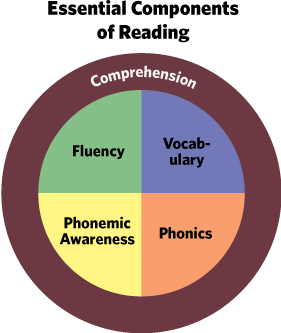
This school year, rareApps will take a deeper look at literacy and technology in specialized settings. Rather than report solely on the features of different apps and technology, our focus will be on examining the five components of reading instruction and investigating technology tools that can leverage research based strategies for instruction as well as support/provide accessibility features so that all students can take advantage of every type of lesson.

November and December: Vocabulary

January: Phonemic/Phonological Awareness

February and March: Phonics

April and May: Comprehension

June: Fluency